Thursday, February 24, 2011

Project Coin Examples with JDK 7 Developer Preview

Mark Reinhold announced availability of the first JDK 7 developer preview today. Reason enough for me to give some of the Project Coin features a shot. I won't get into details here, but instead just show some quick examples. Most of them are self-explanatory anyway.

Source code is also available via github.

Strings in switch

final String str = "foo";

switch (str) {
    case "foo":
        System.out.println("mooh");
        break;
    case "bar":
        System.out.println("miau");
        break;
    default:
        break;
}

Binary integral literals and underscores in numeric literals

final int large = 1_000_000;
System.out.println(large);
   
final int binary = 0b1011;
System.out.println(binary);

Multi-catch and more precise rethrow

class ExA extends Exception {}
class ExB extends Exception {}

public void testMultiCatch() {

    final int a = 0;
        
    try {
        if (a == 0) {
            throw new ExA();
        }
        if (a == 1) {
            throw new ExB();
        }
    } catch (ExA|ExB ex) {
        System.out.println(ex.getClass() + 
             " was thrown and caught");
    }

}

public void testReThrow() throws ExB {

    final int a = 0;

    try {
        if (a == 0) {
            throw new ExA();
        }
        if (a == 1) {
            throw new ExB();
        }
    } catch (final ExA exa) {
        System.out.println("Exa was caught");
    } catch (final Exception ex) {
        System.out.println(ex.getClass() + 
            " was thrown, caught and rethrown");
        throw ex;
    }

}

Improved type inference for generic instance creation (diamond)

final List<String> list = new ArrayList<>();
list.add("Foo");
        
System.out.println(list);

try-with-resources statement

try (final BufferedReader br = new BufferedReader(new FileReader("./TestAutomaticResourceManagement.java"))) {

   String line;
   while ((line = br.readLine()) != null) {
       System.out.println(line);
   }

} catch (final IOException e) {
}

Friday, January 28, 2011

Oracle 1-year review

It's been about a year now since Oracle aquired Sun. Here is a short review of what happened since then:
  • Oracle pulled the plug on the servers of the PostgreSQL build farm with no warning, see here.

  • Oracle kills OpenSolaris? OpenSolaris Board Quits En Masse, see here and here.

  • Prominent Sun employees leave the company, including James Gosling, Tim Bray, Simon Phipps, Tor Norbye, Kohsuke Kawaguchi, see here.

  • Oracle sues Google over use of Java-related patents in Android's Dalvik VM and SDK, see here.

  • OpenOffice.org declares independence from Oracle, becomes LibreOffice, see here.

  • Doug Lea leaves the JCP, see here.

  • Oracle nominates Hologic for JCP, see here.

  • Java SE 7 and SE 8 specs move forward amid protest, see here.

  • Tim Peierls resigned from JCP EC, see here.

  • Apache resigns from JCP EC, see here.

  • Hudson wants to move from Oracle. This story is still going on, see here and here.

  • Ruby on Rails support discontinued in NetBeans IDE, see here.


Tuesday, November 9, 2010

More Impressions of Python (from a Java developer)

Jeff Bail has just written an article on his first impressions of Python. I've been teaching myself Python for the last two weeks as well and I generally share Jeff's impresssions. I just wanted to add some more.

Compared to Java

Python is not that different from Java. Generally it is said that Python is easy to learn. For Java developers it is probably even easier. It's not that different like a Lisp for example. Language constructs are similar. It's object-oriented, you got packages, classes and methods, for-loops and so on. But it's dynamic, so it's a bit more like Groovy.

Object-orientation

Object-orientation seems a bit clumsy (a bit like JavaScript). For example the attributes of a class are declared in the constructor (dynamically) and there is no this keyword, instead a self parameter is passed to the methods of a class to get hold of the instance. I don't know exactly but it feels like object-orientation wasn't part of Python from the beginning. Nonetheless, Python's dynamical nature makes object-orientation very flexible.

Functional Programming

Python supports functional programming. Functions are first class citizens and can be passed around as parameters to other functions for example.

Django

After reading a book about Python I wanted to actually use it in a simple web project with Django. Django is a web application framework similar to Ruby on Rails or Grails. One great feature of Django is it's O/R-Mapping and querying features. A little drawback, but that's more a matter of personal taste, is that it's MVC and template based with a templating language. I've used that in Java with Spring MVC and Freemarker long time ago, but meanwhile I mostly prefer component-based frameworks like Apache Wicket.

Conclusion

I haven't gotten really deep into Python by now, but my first impressions are generally very positive and I already feel comfortable with it. I will also have a look at some other web frameworks in the future, any recommendations?


Wednesday, July 21, 2010

Lambdas in Java Preview - Part 5: Apache Wicket

This is the fifth part in a series of blog posts (read the previous part) giving some practical examples of lambdas, how functional programming in Java could look like and how lambdas could affect some of the well known libraries in Java land. This time I'll have a look at how the addition of lambdas could possibly change the API of the Apache Wicket web framework.

If you are not familiar with Wicket, I can't say how much sense it makes for you to read this article. But Wicket is a component oriented web framework and its programming model in some ways is similar to that of the Swing framework. Some of the ways lambdas will change Wicket could also apply to the Swing framework, so maybe this article actually is still useful for you.

The reason, why Wicket is a good example of how the introduction of lambdas into the Java language might change an API, is that it makes heavy use of anonymous inner classes. Now, anonymous inner classes in Java are often painful to look at and one of the primary reasons to add lambdas to Java is to reduce the need for anonymous inner classes, or better to simplify their usage. This is done mainly through SAM conversion, which means that a lambda expression or anonymous function can be converted to a SAM type, i.e. an interface or abstract class with a single abstract method, when it appears in a position where a SAM type is expected (see previous parts for examples). And as Wicket makes heavy use of implementing abstract classes anonymously (and some of these classes actually are simple callback classes that in fact are SAM types) it seems that there could be a lot of places where we can replace these anonymous inner classes with lambda expressions.

AbstractReadOnlyModels

One of the classes that are mostly implemented anonymously is AbstractReadOnlyModel. It has a single abstract method getObject(). In other words, it's a SAM type.
IModel<String> nameModel = 
   new AbstractReadOnlyModel<String>() {
     @Override
     public String getObject() {
       Person person = personModel.getObject();
       return person.getFirstName() + ", " 
                + person.getLastName();
     }
  };

TextField<String> name = new TextField<String>("name", nameModel);
The important part of this is just the body of the getObject method, but about the same amount of code is just noise. With lambdas we could remove most of this noise.
AbstractReadOnlyModel<String> nameModel = #() {
  Person person = personModel.getObject();
  return person.getFirstName() + ", " 
           + person.getLastName();
};

TextField<String> name = new TextField<String>("name", nameModel);
Here we basically replaced the anonymous inner class with a lambda expression, which has the same body as the getObject() method before. This lambda expression will automatically be converted to an AbstractReadOnlyModel.

One thing to note is, that the compiler must have a chance to infer the target SAM type. In the example above we explicitly declared the variable to be of type AbstractReadOnlyModel, but for example, if you call the constructor TextField(String wicketId, IModel model), you cannot pass a lambda expression inline like this

TextField<String> name = new TextField<String>("name", #() {
  Person person = personModel.getObject();
  return person.getFirstName() + ", " 
           + person.getLastName();
});
because IModel is not a SAM type and the compiler cannot infer that you want the lambda to be converted to an AbstractReadOnlyModel.


LoadableDetachableModels

Another commonly used model class is LoadableDetachableModel, which has the load() method as its single abstract method.
final Long personId = ...
IModel<Person> personModel = 
  new LoadableDetachableModel<Person>() {
    @Override
    protected Person load() {
      return getPersonDao().get(personId);
    }
};
So, same as with the AbstractReadOnlyModel, we can replace it with a lambda expression.
final Long personId = ...
LoadableDetachableModel<Person> personModel = #() (getPersonDao().get(personId));

Components

Components are another essential type of classes in Wicket. There are some Wicket components that are SAM types, especially those that handle some kind of event. Often such components are implemented as anonymous inner classes. Take for example an AjaxButton
Button submit = new Link("submit", form) {

 @Override 
 protected void onSubmit(AjaxRequestTarget target,
   Form<?> form) {
  System.out.println("form submitted");
 }

};
Its single abstract method is onSubmit(), but there is an important difference to the SAM types shown before. Components don't have a no-arg constructor, they all take at least a wicketId as a constructor argument. The proposals don't give an answer if to permit an argument list for other than the no-arg constructor for SAM conversion. If it would be allowed, it would possibly look like this
AjaxButton submit = 
    AjaxButton("submit", form)#(
      AjaxRequestTarget target, Form<?> form){
        System.out.println("form submitted")
      };
On the other hand, a future version of Wicket could be designed differently, in order to better support SAM conversion. Let's build a sub class of AjaxButton that relies more on composition instead of inheritance (Wicket in general is the other way round, though). Our subclass, instead of having to override onSubmit, it could take a callback argument:
public class MyAjaxButton extends AjaxButton {

private IAjaxButtonOnSubmitCallback onSubmitCallback;

public MyAjaxButton(String id, Form<?> form,
  final IAjaxButtonOnSubmitCallback onSubmitCallback) {
 super(id, form);
 this.onSubmitCallback = onSubmitCallback;
}

@Override
protected void onSubmit(AjaxRequestTarget target, Form<?> form) {
 onSubmitCallback.onSubmit(target, form);
}
IAjaxButtonOnSubmitCallback is a SAM type
public interface IAjaxButtonOnSubmitCallback 
    extends IClusterable {

  void onSubmit(AjaxRequestTarget target, Form<?> form);

}
so we can call the constructor of our button with a lambda expression as the last argument (here with the arrow syntax and type inference of the latest proposal)
AjaxButton submit = 
  new MyAjaxButton("submit", form, { target, form -> 
    System.out.println("form submitted");
  });
The same principle (composition over inheritance) would work for a lot of other Wicket components, generally for all components that have some sort of callback mechanism for certain events, e.g. form submit events, form validation error events, link clicked events, dropdown selection changed events and so on. If all these events were executed by callbacks instead of by abstract methods, then SAM conversion could be used efficiently.

In general, there are two cases, where we could think about introducing additional callback classes: First, if a class is a SAM type, but does not have a no-arg constructor, we could replace the single abstract method with a call to a callback we give to that component. And second, if a class isn't a SAM type, but has more than one abstract method instead, we could provide a callback for each of these abstract methods. This would quite change the design of Wicket, but would better support SAM conversion.

Another class of components where this principle applies, is all sorts of populators. Take for example the columns of a DataTable.
IColumn<Person> personColumn = 
  new AbstractColumn<Person>(Model.of("Person")) {

  @Override
  public void populateItem(
    final Item<ICellPopulator<Person>> cellItem,
    final String componentId, final IModel> rowModel) {
     ...
Again, AbstractColumn does not have a no-arg constructor, so we (probably) cannot use SAM conversion directly. But instead we could write our own sub class of AbstractColumn that takes an IColumnPopulator (a SAM type) and calls it from its populateItem method.
IColumn<Person> personColumn = new AbstractColumn<Person>(Model.of("Person"), IColumnPopulator populator) {

 @Override
 public void populateItem(
   final Item<ICellPopulator<Person>> cellItem,
   final String componentId, final IModel> rowModel) {
    populator.populateItem(cellItem, componentId, rowModel);
  }
A column could then be created a bit more concise like this:
IColumn<Person> personColumn = 
    new MyAbstractColumn<Person>(Model.of("Person"), 
     { cellItem, componentId, rowModel ->
 ...
});

In summary, Wicket has lots of opportunities to make use of SAM conversion, which would reduce the need for anonymous inner classes. In cases where these SAM types don't have a no-arg constructor it is not clear yet, if SAM conversion can be applied to them. For these types a different design which prefers composition over inheritance would allow SAM conversion, though. Same is true for classes that have more than one single abstract method, which could use callback classes instead of abstract methods.


Thursday, July 15, 2010

Lambdas in Java Preview - Part 4: Proposal Update

This is the fourth part in a series of blog posts (read part 3 and part 5) giving some practical examples of lambdas, how functional programming in Java could look like and how lambdas could affect some of the well known libraries in Java land. This part describes shortly the changes of a new proposal, that has been published while writing this series, and how it changes some of the examples in this series.

The new proposal
Last week Brian Goetz published a new proposal to add lambda expressions to Java, that builds on the previous straw-man proposal. The two biggest changes are that function types have been removed and that there will be more type inferencing than before. Also the new proposal uses a different syntax for lambda expressions, but it also states, that this doesn't reflect a final decision on the syntax. But let's have a short look at each of these points.

No more function types
At first, this sounds irritating. Without function types, how could we pass functions to other methods or functions? We need to declare them as parameters somehow. The answer is that functions or better lambda expressions have to be converted to SAM types. Remember that SAM types are single abstract method types, like interfaces with only one method or abstract classes with only one abstract method, and that lambda expressions can automatically be converted to such types. This is called SAM conversion, which I've also discussed in the first part of this series.

So, function types will be primarily replaced by SAM conversion, lambda expressions can only appear in places where they can be converted to a SAM type. I don't fully understand the reasons behind this decision, but in a way it actually makes sense. As shortly mentioned in the first part of this series, from an API designer's perspective you don't have to scratch your head anymore if your methods should take a function type or a SAM type as an argument. And SAM types would probably turn out to be more flexible, anyway.

However, this will change almost all of the examples in this series. In all places, where a method took a function as an argument, the type of this argument must be changed to a SAM type, and I've almost everywhere used function types. We'll have a look at this later, and see if it makes sense now to have some generic function interfaces for functions like Function<X,Y>.

More type inferencing
As we've also seen in the examples in this series, lambda expressions can be quite verbose, because of type declarations. The new proposal says, that basically all types in lambda expressions can be inferred by the compiler - their return types, the parameter types and the exception types. This will make lambdas much more readable.

Alternative syntax
As said, the syntax of the new proposal does not reflect a final decision, but it is much more like in Scala or Groovy in this proposal.
FileFilter ff = {file -> 
    file.getName().endsWith(".java") };
Although I personally like this arrow syntax much better, I'll stick with the #-syntax in this series because the prototype uses it.

More changes
Just for completeness, the proposal contains some more changes. this in lambdas has different semantics than before, break and continue aren't allowed in lambdas, and instead of return, yield will be used to return values from a lambda expression (there are no details on how yield exactly works). Also, there will be method references, that allow for referencing methods of an existing class or object instance.

Impact on the examples
Now, let's have a look at how the new proposal changes some examples of the previous posts. The file filtering example from part 1 looked like this:
public static File[] fileFilter(File dir, #boolean(File) matcher) {
    List<File> files = new ArrayList<File>();
    for (File f : dir.listFiles()) {
        if (matcher.(f)) files.add(f);
    }
    return files.toArray(new File[files.size()]);
}
The client code looked like this:
File[] files = fileFilter(dir, #(File f)(f.getName().endsWith(".java")));
As there will be no function types anymore, we will have to change the fileFilter, so that it takes a SAM type instead of a function type. In this case it's simple, we could simply change the second argument's type to FileFilter and call its accept() method:
public static File[] fileFilter(File dir, FileFilter matcher) {
    List<File> files = new ArrayList<File>();
    for (File f : dir.listFiles()) {
        if (matcher.accept(f)) files.add(f);
    }
    return files.toArray(new File[files.size()]);
}
The client side is still the same, though.

Now, as you might have noticed (or remembered from part 2) this is quite a bad example, because there actually is already the File.listFiles(FileFilter) method we can also call with a lambda:
File[] files = dir.listFiles(#(File f)(f.getName().endsWith(".java")));
The lambda will be converted to a FileFilter automatically in this case. But despite the fileFilter method is a bad example, it shows quite well that the removal of function types has very little impact, if there is already a corresponding SAM type.

Before we go further, here's the client side with the arrow syntax and type inference:
File[] files = fileFilter(dir, f -> { 
    f.getName().endsWith(".java") });
Now, let's see how the removal of function types changes the examples in the abscence of an appropriate SAM type. For that here is the List<T>.map function from part 3 again:
public <S> List<S> map(#S(T) f) {
    List<S> result = new ArrayList<S>();
    for (T e : this) {
        result.add(f.(e));        
    }    
    return result;
}
We need to replace its function type argument f by a SAM type. We could start by writing an interface Mapper with a single method map. This would be an interface especially for usage with the map function. But having in mind, that there are probably many more functions similar to our map function, we could create a more generic Function interface, or more specifically an interface Function1<X1,Y> which represents a function that takes exactly one argument of type X1 and returns a value of type Y.
public interface Function1<X1,Y> {
    Y apply(X1 x1);
}
With this we could change our map function taking a Function1 instead of a function type argument:
public <S> List<S> map(Function1<T,S> f) {
    List<S> result = new ArrayList<S>();
    for (T e : this) {
        result.add(f.apply(e));        
    }    
    return result;
}
Again, the client side would still be the same. The lambda expression will be converted to a Function1.
List<Integer> list = new List<Integer>(2,4,2,5);
List<String> result = list.map1(n -> {"Hello World".substring(n)});
The other examples are basically the same, so I think this is enough to show the changes that the new proposal brings by removing function types.

Finally let's have a short look at the new syntax and the stronger type inferencing. With the initial proposal a File.eachLine method, could be called like this (see also part 2).
file.eachLine(#(String line) {
  System.out.println(line);
});
This would look more like this with the new proposal's syntax:
file.eachLine(line -> {
  System.out.println(line);
});
And with some more syntactic sugar, e.g. if it was allowed to remove parentheses, leave out a lambdas argument if it just takes a single argument and call it it in this case, then it would look even more like a groovy control structure:
file.eachLine {
  System.out.println(it);
};
But this is not part of the any proposal, yet.


To summarize, the removal of function types does not have such a huge impact on the examples, and in a way it removes complexity and feels more Java-like. To me it would be quite reasonable to have generic function SAM types in the standard libraries, e.g. Function0 for a function that takes no arguments, Function1 for a function that takes one argument and so on (up to Function23, then Java would have more than Scala, yay!). Further complexity is removed by the stronger type inferencing capabilities.


Tuesday, July 13, 2010

Lambdas in Java Preview - Part 3: Collections API

This is the third part in a series of blog posts (read part 1, part 2 and part 4) giving some practical examples of lambdas, how functional programming in Java could look like and how lambdas could affect some of the well known libraries in Java land. In this part I'll focus on how the addition of lambdas could affect one of the most used standard APIs - the Collections API.

Note: While writing this post, a new proposal has been published, that uses a different syntax for lambdas, removes function types and uses more type inferencing. I'll post a short description of the changes soon. The new proposal would change some of the examples in this post, but the examples are still essentially valid and useful.


The Collections API is one of the most used APIs around in Java. Amongst its mostly used collection types are lists, sets and maps. Also the Collections class, which provides utility methods for operating on these collections is commonly used. The reason why I chose the Collections API as an example on how lambdas might influence existing APIs is that certain kinds of operations on collections can be written much more natural in a functional programming style than in an imperative style. This is also one of the reasons for the growing number of projects that aim to bring functional elements to Java in the form of libraries, e.g. Google Collections or lambdaj.

Status quo
One of the common operations on lists is filtering a list for elements matching a certain condition, say for example filtering a list of integers for the even ones. We could implement a method findEven like this:
List<Integer> findEven(List<Integer> list) {
  List<Integer> result = new ArrayList<Integer>();
  for (Integer n : list) {
    if (n % 2 == 0) result.add(n);
  }
  return result;
}
We can call it with a list of integers and it will return a list containing the even integers. Works just fine, but what if we'd also want a method that returns only the odd elements? There is no straight way of building an abstraction for that, so we'd write a method findOdd which would look 99.3865% the same as findEven.

Google Collections to the rescue we can use the Iterables.filter method which takes a list and filters it by a given Predicate.
Iterable<Integer> even = Iterables.filter(list,
  new Predicate<Integer>() {
    @Override
    public boolean apply(final Integer n) {
        return n % 2 == 0;
    }
  });
This filter method is way more flexible as it can take any predicate you like to filter by. But actually it really doesn't look nice, at least unless you build your own library of reusable predicates.

Simplification through lambdas
Now, if we have a look at it, the essential part of the predicate is just the expression n % 2 == 0. The rest is just boilerplate. With lambdas we can actually remove all(!) of this boilerplate. To do that, we implement a filter method quite similar to that of the Google Collections, but instead of taking a predicate of type Predicate as the second argument, it'll take the predicate as a lambda:
public static <T> List<T> filter(List<T> list, 
    #boolean(T) predicate) {
  List<T> result = new ArrayList<T>();
  for (T t : list) {
    if (predicate.(t)) result.add(t);
  }    
  return result;
}
Say we have implemented this filter method in a class called FCollections, calling it looks like this then:
List<Integer> list = Arrays.asList(4,3,2,6,4);
List<Integer> even = FCollections.filter(list, #(Integer n)(n % 2 == 0));
Compare that to calling the Google Collections filter method. It's much more concise, readable and expressive.

Extension methods
Before we have a look at more operations on collections of this sort, I want to mention a feature that will probably also be introduced in JDK7 - extension methods.

Notice that we have put our filter method in a utility class FCollections. But filter should probably rather be a method of List or Collection itself. Unfortunately, adding a new method to these interfaces would break existing sub classes of List or Collection, something we definitively wouldn't want. Now, extension methods allow for adding a new method to an interface and specifying a default implementation of this method:
public interface List<E> extends Collection<E> {
    
    List<E> filter(#Boolean(E) predicate) import static Collections<E>.filter;
    ...
Now, if a sub class of List doesn't implement a filter method itself Collections.filter is called by default. Collections.filter would look like our FCollections.filter method - it takes a list as the first argument followed by the predicate lambda and it must return a List.

So with extensions methods it would be possible to add new operations on collection types like those showed in this post without breaking existing sub classes (at least as long as these subclasses didn't implement an incompatible filter method before). But extension methods are not the primary topic of this post (search the web for extension methods or public defender methods for more details), let's go back and see some more useful operation on collections.

More operations
There's a bunch of operations that can be implemented in a more functional style, e.g. iterating a list and applying a function to each element.
public class MyList<T> extends ArrayList<T>
  
  public void each(#void(T) f) {
    for (T e : this) {
      f.(e);        
    }     
  }
Instead of iterating with a for loop, we can call the each method like this:
list.each(#(Integer n)(System.out.println(n)));
Another example is the map function that takes a function, applies it to each element of the list and returns the result as a list:
public <S> List<S> map(#S(T) f) {
  List<S> result = new List<S>();
    for (T e : this) {
        result.add(f.(e));        
    }    
    return result;
}
We could use it to create a list of squares from a list of integers:
List<Integer> squares = list.map(#(Integer n)(n*n));
foldLeft is a another method that combines the elements of a list together using a function f from left to right (foldRight does the same from right to left) starting with a value z, i.e. the result is f(f(f(f(f(z,a1),a2),a3),a4),a5)
public <S> S foldLeft(S z, #S(S, T) f) {
    S acc = z;
    for (T e : this) {
        acc = f.(acc, e);
    }    
    return acc;
}
A simple way to use it would be to calculate the sum of the elements:
Integer sum = list.foldLeft(new Integer(0), #(Integer a, Integer b)(a+b));
reduce does the same, but without an initial value.
public T reduceLeft(#T(T, T) f) {
    if (isEmpty()) throw new UnsupportedOperationException("reduce on empty list"); 
    if (size() == 1) return get(0);

    T acc = get(0);
    for (T e : subList(1, size())) {
        acc = f.(acc, e);
    }    
    return acc;
}
Integer sum = list.reduceLeft(#(Integer a, Integer b)(a+b));
The find method searches for the first element matching a given predicate and returns it:
public T find(#Boolean(T) predicate) {
    for (T e : this) {
        if (predicate.(e)) return e;
    }    
    return null;
}
Integer found = list.find(#(Integer n)(n>5));
There are many more possibilities to use predicates in this way, here are some short examples:
boolean hasPrime = list.exists(#(Integer n)(isPrime(n));
boolean allPrimes = list.forall(#(Integer n)(isPrime(n));
boolean countPrimes = list.count(#(Integer n)(isPrime(n));
boolean withoutPrimes = list.remove(#(Integer n)(isPrime(n));
Pair<List<Integer>> oddAndEven = list.partition(#(Integer n)(n%2==0));

To summarize, as you can see the Collections API could benefit in a lot of ways from the addition of lambdas. For some sort of operations, lambdas would increase readability, conciseness and expressiveness. Extension methods could make it possible to have some of the new operations directly in the collection classes instead of in utility classes like Collections.


Monday, July 5, 2010

Lambdas in Java Preview - Part 2: Functional Java

This is the second part in a series of blog posts (read part I) giving some practical examples of lambdas, how functional programming in Java could look like and how lambdas could affect some of the well known libraries in Java land. This part focusses on general functional programming techniques, which will be available through the addition of lambdas. Functional programming (although I still wouldn't consider Java a functional programming language) will make Java code more concise, more expressive and more readable in certain kinds of problem situations.

Note: All the following examples work with the current prototype implementation of lambdas.

Simplifying code
Let's start with a simple example that shows how higher-order functions in general can lead to simplified code. Suppose we want to search for files of a certain type. Up to now, we would probably use a FileFilter:
File dir = new File(".");

File[] files = new File(".").listFiles(new FileFilter() {
    public boolean accept(File file) {
        return file.getName().endsWith(".java");
    }
});
But with higher-order functions we could write a method that takes the filtering logic as a function argument. Think of this code as being part of an API.
public static File[] fileFilter(File dir, #boolean(File) matcher) {
    List<File> files = new ArrayList<File>();
    for (File f : dir.listFiles()) {
        if (matcher.(f)) files.add(f);
    }
    return files.toArray(new File[files.size()]);
}
The client code of this API would be a one-liner then:
File[] files = fileFilter(dir, #(File f)(f.getName().endsWith(".java")));
Callback mechanisms like filtering files with a FileFilter like above can generally be greatly improved by replacing the callback class with a function. And in fact, callbacks with only one method are so common in Java, that there will be special support for so called SAM types (single abstract method, see also first part of this series) from project lambda. This allows us to call the existing File.listFiles(FileFilter) method with a function instead of a FileFilter. Because FileFilter is a SAM type, the function will automatically converted into a FileFilter then:
File[] files = dir.listFiles(#(File f)(f.getName().endsWith(".java")));

Currying
One of the features most functional languages support (some even make very excessive use of it) is currying. Currying allows for defining a function with multiple parameters and allow the client to call it with fewer parameters, which will return a function in which the given parameters are fixed. A simple example would be a function that takes two parameters x and y and returns the sum. The client could the call this function with a fixed value for x, say 5, but without a value for y. This would result in a function that takes one parameter y and returns 5+y. Let's try to implement this curried function in Java:
##int(int)(int) sum = #(final int x)(#(int y)(x+y));
assert sum.(3).(5) == 8;

#int(int) add5 = sum.(5);
assert add5.(4) == 9;
Here we first define a function sum of type ##int(int)(int), i.e. of type function that takes an integer and returns a function of type #int(int). We can evaluate this in a single statement sum.(3).(5). The first call sum.(3) will basically result in a lambda expression #int(int y)(3+y). The second call will evaluate this expression passing 5 as the value for y. But instead of evaluating the whole expression, we can also evaluate it partially, as in line 4. This will result in a function add5, that could be called with different values of y and would return 5+y.

That's what currying in Java could look like. Agreed, it looks nicer in other languages, but it generally works. Maybe some syntactical sugar could still be added.

Control Abstractions
Another feature of many functional languages is the possibility to build control abstractions that look like natural syntax. This is made possible through currying and higher-order functions in general. Let's have a look at a simple example.
##void(#void())(int) afterDelay = #(final int n) {
  return #(#void() f) {
    try {
      Thread.sleep(n*1000);
      f.();
    } catch (Exception e) {}
  };
};
afterDelay is a higher-order function, it takes an integer n as argument and returns a function that takes a function f. The returned function will execute f after n seconds. We can invoke it directly like
afterDelay.(2).(#()(System.out.println("foo")));
which will print "foo" to the console after waiting for two seconds. Or we can make use of currying to create another function after5Seconds, which is a function that takes another function and evaluates it after waiting for 5 seconds.
#void(#void()) after5Seconds = afterDelay.(5);

after5Seconds.(#()(System.out.println("foo")));
after5Seconds.(#()(System.out.println("bar")));
Now this still looks like a normal function call and not like a control abstraction, yet. But it is simple to make it look like one. Just replace the parentheses with curly braces
after5Seconds.(#() {
    System.out.println("foo");
    System.out.println("bar");
});
and it almost looks like other control structures like for or if.

Now, let's have a look at another example that demonstrates the loan pattern:
##void(#void(PrintWriter))(File) withWriter = 
  #(final File file) {
    return #(#void(PrintWriter) doWithWriter) {
      PrintWriter writer = null;
        try {
          writer = new PrintWriter(file);
          doWithWriter.(writer);
        } catch (Exception e) {
          // Just ignore exceptions, see straw-man
          // proposal for exception handling with 
          // lambdas
        } finally {
          if (writer != null) { 
            writer.close();
          }      
        }
    };
};
Simply said, withPrintWriter is a function that takes a file as its argument and opens a PrintWriter on that file. Then it calls a function given by the caller with this PrintWriter (or loans it to the function). Things will probably get a lot clearer having a look at how to call withPrintWriter.
File file = new File("log.txt");

withWriter.(file).(#(PrintWriter writer) {
    // Printing to the file
    writer.println("foo");
    for (int i=0;i<10;i++) writer.println(i);
});         
As withWriter is a curried function, we can evaluate it partially (just with a file) and assign the result to a variable of function type, which can be called multiple times.
#void(#void(PrintWriter)) logger = withWriter.(file);

logger.(#(PrintWriter writer) {
    writer.println("foo");
});         
logger.(#(PrintWriter writer) {
    for (int i=0;i<10;i++) writer.println(i);
});
Note, withWriter can also be implemented as a non-curried function. We could pass the function directly as a second argument to it.
#void(File, #void(PrintWriter)) withWriter = 
  #(final File file, 
      final #void(PrintWriter) doWithWriter) {
    PrintWriter writer = null;
    try {
      writer = new PrintWriter(file);
      doWithWriter.(writer);
    } catch (Exception e) {
    } finally {...}  
  }
};

withWriter.(new File("log.txt"), #(PrintWriter writer) {
  writer.println("Hello ");
  writer.println("World.");
});         
This kind of control abstractions can be very useful for code reuse, e.g. to remove boilerplate code in resource handling (withWriter, withReader, ...) or transaction handling (inTransaction).

For the fun of it let's do another example, which simplifies reading the lines of a file one by one:

#void(File, #void(String)) eachLine = 
  #(final File file, final #void(String) fun) {
    FileInputStream in = null;
    try {
      in = new FileInputStream(file);
      BufferedReader reader = 
        new BufferedReader(new InputStreamReader(in));
      String line = null;
      while((line = reader.readLine()) != null) {
        fun.(line);
      }
    } catch (Exception e) {
    } finally { /* close in */ }      
  }

};
Again, think of eachLine as being part of an API, hidden from the client. On the client side things get really easy.
File file = new File("log.txt");

eachLine.(file, #(String line) {
  System.out.println(line);
});
In fact eachLine should probably be part of the class File itself. And maybe it will get in there in JDK7 via an extension method (which is a topic of a following post).

Originally, I didn't plan to write that much about control abstractions (it's just too much fun, though), but instead cover recursion as a functional technique, too.

Recursion
Unfortunately, until now it's not quite clear how recursive calls in lambda expressions would look like or if it will even be possible to write recursive lambdas (if it wasn't possible we could still call recursive methods from a lambda). There are currently some discussions going on the project lambda mailing list, so I'll skip this topic for now.


To summarize, functional techniques allow for some code simplifications in certain scenarios as described above. Actually, this was also the primary reason to introduce lambda expresssions, namely for simplifying code for the new fork/join framework and parallel arrays. But lambdas make it possible to simplify code in a lot of other use cases as well.

Wednesday, June 30, 2010

Lambdas in Java Preview - Part 1: The Basics

As announced at Devoxx last year, closures (or better lambda expressions) will (probably) be added to JDK7. The team of project lambda has checked in initial parts of the implementation into the OpenJDK repositories. This is the first part (see part 2) in a series of blog posts giving some practical examples of lambdas, how functional programming in Java could look like and how lambdas could affect some of the well known libraries in Java land. Although most of the examples will work with the current prototype implementation, keep in mind, that this is just a preview, which is based on the straw-man proposal, the specification draft, the discussions on the project lambda mailing list and the current state of the prototype. There might/will be both semantical and syntactical differences to the final version of lambdas in Java. Also some details are left out, e.g. exception handling will probably be out of scope.

The focus of this series is on practical usage of lambdas, not in principal on the fundamental concepts of lambdas. You don't need to have any theoretical knowledge of lambda calculus or a strong background in functional programming. And don't break your mind on what closures are, just think of them as anonymous functions or code blocks that can be passed around. But despite you don't need to know about all this, I don't want to discourage you from researching these topics.

Note: If you want to try out some examples there's a little trick to get the lambda prototype working, see here.

Lambda expressions
To get started, let's have a look at a very simple example of an anonymous function or "lambda expression". The following is a lambda expression that takes an integer x and returns 2*x:
#(int x)(2*x)
The hash symbol introduces the lambda expression, or "function literal". The first pair of parentheses is a comma-separated argument list and the second pair of parentheses encloses the expression, which is evaluated on invocation. Here is another example of a lambda expression, that takes two arguments x and y and returns their sum:
#(int x, int y)(x+y)
What we would naturally do with a lambda expression is to evaluate it. We could directly invoke one of the function literals above directly with #(int x)(2*x).(7), but this will probably be a bit uncommon.

Function types
Instead invocation will mostly happen on variables of a function type. So we first bind a function to variable and do the invocation on that. The syntax for function types is very similar to the syntax of function literals:
#int(int) doubler = #(int x)(2*x);
This declares a variable doubler of type #int(int), i.e. of type function that takes an int (in parentheses) and returns an int (after the #). Now, to invoke doubler we can write
int n = doubler.(3);
assert n == 6; 
Notice the dot before the parentheses. For another example, let's look at the sum lambda again:
#int(int, int) sum = #(int x, int y)(x+y);
int x = sum.(3, 7);
assert x == 10;
More complex expressions
So far the body of the lambda expressions was just a single expression. In this case it can be included in parentheses and the return keyword can be omitted. In the more complex case the body can be a block with curly braces and must explicitly return a value (if it's not void):
#int(int, int) max = #(int x, int y) {             
    if (x >= y) return x;
    else return y;
};
int z = max.(3,4);
assert z == 4;
Higher-order functions
Of course, functions can also be passed as arguments to methods and other functions. This will be the most common usage. A function, that takes an integer n and function f, that executes f n times could look like this:
public static void times(int n, #void(int) f) {
    for (int i=0;i<n;i++) {
        f.(i);
    }
}
The following will print the squares of 0 to 4 on the console.
times(5, #(int index)(System.out.println(index*index)));
Functions and methods can also have a function as their return value. The following method takes an integer x and returns a function that takes another integer y and returns x*y.
public static #int(int) multiplier(final int x) {
    return #(int y)(x*y);
}
The invocation looks like this:
#int(int) mult5 = multiplier(5);
assert 20 == mult5.(4);
This case also shows, that it is possible to capture variables from the enclosing scope (this is what makes it a closure by the way). x is a free variable and its definition is copied over into the body of the lambda expression at runtime. For this to work x must be declared effectively-final or shared (see straw-man proposal for details).

That's it
That's basically it for the fundamentals of lambda expression in Java. But you will probably have noticed by now, that it will have a huge impact on Java, both the language and the libraries.

Side note: Some people don't like the syntax of lambdas as above. I don't want to start the discussion here again, just two points. First, the syntax can actually be awkward in some cases, but most of the time it's just passing around functions as literals or variables, which doesn't look awkward. And second, because Java is a statically typed language and has features like checked exceptions and others, closures won't look like in dynamically typed languages or languages with strong type inferencing or languages without checked exceptions.

Function conversion
This last section is about function conversion, which isn't something that is essential to lambda expressions, but will also have a huge impact. Many Java libraries use so called SAM types (single abstract method) - interfaces with only a single method and abstract classes with only one abstract method. Function conversion means that a function of appropriate type can be converted into an anonymous instance of a SAM type as needed. For example, the Collections.sort method takes a List and a Comparator, which has a single abstract method int compare(T x, T y). Up to now this would look like this:
// This would be just '= [4,2,1,3]' 
// with collection literals
List<Integer> list = 
    Arrays.asList(new Integer[]{4,2,1,3});

Collections.sort(list, new Comparator<Integer>() {
    public int compare(Integer x, Integer y) {
        return -x.compareTo(y);
    }
});
But with function conversion we can substitute a function of appropriate type:
Collections.sort(list, 
    #(Integer x, Integer y)(-x.compareTo(y)));
This will probably be used very often, because SAM types are so common in the Java world. As a side note, an open questions to me is, if API designers should choose to take functions as arguments to their methods/functions or SAM types, which may be more flexible and more expressive.

Final example
For a final example we implement the Fibonacci function and call it several times in parallel threads.
class ParallelFib {

    final static #void(int,int) fib = 
        #(int c, int n) {
            int result = fib(n);
            System.out.println(c + ") " + 
                "fib(" + n + ") = " + result);
        };

    public static int fib(int n) {
        if (n == 0 || n == 1) return 1;
        else return fib(n-1) + fib(n-2);
    }

    public static void main(String[] args) {  

        for (int i=0;i<10;i++) {
            final int i2 = i;
            new Thread(#()(fib.(i2, 32))).start();
        }    

    }

}
fib first occurs as a class variable of function type. This lambda expression takes a counter c and input n, calls the method fib (I don't know, if recursive lambda calls are possible at the moment) and then prints the counter and the result. The main method creates 10 threads each taking the fib lambda expression, which is converted implicitly into a Runnable. The output is something like this:
1) fib(32) = 3524578
3) fib(32) = 3524578
2) fib(32) = 3524578
0) fib(32) = 3524578
7) fib(32) = 3524578
4) fib(32) = 3524578
9) fib(32) = 3524578
6) fib(32) = 3524578
8) fib(32) = 3524578
5) fib(32) = 3524578
Feel free to post comments on what you think about lambdas right here, or give feedback directly to the members of project lambda, which I think is always welcome.

Monday, June 14, 2010

Eclipse Helios Preview for Java Developers

The final release of the new Eclipse 3.6 - Helios is coming close on June 23. Here is a short overview of some of the new features for Java developers.

Open Implementation
Open Implementation, which was available by holding Ctrl and hovering over a method in the editor, is now also available in the navigate menu and can be bound to a keyboard shortcut (e.g. F4?).


Expressions View
When debugging, it's now easier to add expressions in the expressions view and the expressions view has now columns


Breakpoints View
The breakpoint view now provides the possibility to quickly edit some properties of the breakpoint, e.g. breakpoint condition.

Dragging and linking files from operating system
You can now drag files from the operating system into the package explorer and instead of copying them there you can create just links. This feature is definitely useful in a lot of cases.


Move Type to New File Refactoring
Convert Member to Top Level Type has been renamed to Move Type to New File.


Javadoc includes annotations
This is a feature I've been waiting for quite long. The JavaDoc hovers now include information about annotations.

Tuesday, June 1, 2010

So you find Java 7 closure syntax nasty?

Two days ago Baptiste Wicht blogged about the first version of closures pushed by Oracle. He says "This syntax is a little bit shocking, but I think we’ll get used." and the comments to his post go like "Really ugly" and "terrible syntax". Same over at Java Posse Google Group: "closures are looking worse by the day", "I realllllly don't like the look of them", "Wow that's ugly. Source code obfuscaters are going to have a blast".

But let me ask one question: Why has it taken so long for the Java community to realize that? It's just a few month until JDK7 is going to be released, but the closure debate has been around for quite a long time now (not to say years). There were several proposals, there has been the straw-man proposal and the spec draft and the announcement last Devoxx. But there hasn't been much of a discussion in the community.

What is the reason for that? I have some assumptions. Has project lambda been too quiet? There weren't many blog posts or examples. Or is there something broken with the community? Were have the community leaders been? Are they too busy learning Scala? Or is it just that closures in a statically typed language (without type inferencing) are intrinsically complex?


And by the way, what about Java modularity?


Sunday, February 7, 2010

Groovy++ Performance - Now we're talkin'

This is a follow-up of my last post, where I compared the runtimes of the quicksort algorithm implemented in Java, Scala, Groovy and Groovy++. Groovy++ came up with a significant improvement over Groovy. But there was a comment by ait (Thanks ait) on how to improve the performance of the Groovy++ implementation even further, by changing a single line. In fact, this improved the performance dramatically.

In the previous post I showed the de-compiled byte code of the Groovy++ implementation of the algorithm. There were two things that were different from the Java byte code: array access via ArraysMethods.getAt(index) and the integer boxing und calculation. Ait recommended to change the following line

into


Obviously, this tackles the integer handling problem. After changing this line I ran the code again and had a look at the timings. The results are amazing. Here they are for sorting 100.000 and 1.000.000 integers:

n100.0001.000.000
Java1295
Scala1295
Groovy375041700
Groovy++ (old version)5154900
Groovy++ (new version)19130


This is marvellous! Now Groovy++ is really on a par with Java and Scala!


De-compiling the byte code again shows the difference. Here's the old byte code:

And here is the new version:

Still, there is no native array access, but the integer boxing is gone, it's primitive integer calculations.

Ait (Is that you, Alex?) will come up with a post with more details. I'll provide a link here then.


Update: These are the numbers for Java, Scala and Groovy with shifting instead of division. Only Groovy can take advantage of this:
n100.0001.000.000
Java1190
Scala1290
Groovy190022000
Groovy++ (new version)19130


Saturday, February 6, 2010

Groovy++ vs. Groovy vs. Java vs. Scala - Performance Update

I've been writing about a performance comparison between Java, Scala and Groovy in this and this post, where I compared the runtimes of these languages for a straight-forward (and far from idiomatic) implementation of the quicksort algorithm. As you might have heard, there's a new kid on the block: Groovy++ a.k.a. static Groovy. I was eager to see, how this would improve Groovy's results.

So, (without any further justification of this comparison) I took the same source code for Java, Scala and Groovy as previously and took this modified version of the Groovy code for Groovy++:


So, I basically took the Groovy code, and added the @Typed annotation and some more type information. I ran this on my machine with Java 1.6.0 Update 17, Scala 2.7.7, Groovy 1.7 and Groovy++ which is based on Groovy 1.8.0-SNAPSHOT. Here are the results (in ms) for sorting 100.000 and 1.000.000 integers:

n100.0001.000.000
Java1295
Scala1295
Groovy375041700
Groovy++5154900


Obviously, while still Java and Scala are by far the fastest, Groovy++ makes a huge difference. Groovy takes about 312x the time of Java/Scala, Groovy++ just takes 42x.

While there isn't much difference in the source code of Groovy and Groovy++, there is of course a big difference in the generated byte code. I had a look at it with the Java Decompiler. The Groovy byte code contains lots of dynamic dispatch code, while there's not much in the Groovy++ byte code that indicates that it was compiled from Groovy. Here's a short excerpt:


public Object quicksort(int[] a, int L, int R) {
while (true) {
int m = ArraysMethods.getAt(a, DefaultGroovyPPMethods.div(DefaultGroovyPPMethods.box(L + R), DefaultGroovyPPMethods.box(2)).intValue());
int i = L;
int j = R;
while (i <= j) {
for (; ArraysMethods.getAt(a, i) < m; (i++));
for (; ArraysMethods.getAt(a, j) > m; (j--));
if (i <= j) {
swap(a, i, j);
(i++);
(j--);
}
}
if (L < j) quicksort(a, L, j);
if (R <= i) break; R = R; L = i; a = a; this = this; } return null;
}


This isn't even far from the byte code generated by java. There is just that autoboxing of integers, integer division and the array access with getAt(). Considering the early state of Groovy++ this looks very promising.


Update: There's is a follow-up post that shows how to tune the Groovy++ code to make it run as fast as Java and Scala (Thanks to ait, see comments).


Wednesday, December 16, 2009

Lift from a Wicket Developer's Perspective

I've been messing around with Scala again lately. After learning the basics of the Scala language, I decided to have a look at the lift web framework - "the simply functional web framework". In this highly subjective post I will outline, why I'll stick with Wicket.

My Lift Experience


To be clear, I'm not an experienced Scala developer. I did my first steps in Scala a year ago or so, and I just started learning Lift by having a look at the getting started guide. But this short first impression was enough for me to decide, that I'm not going any further with lift. Without going into much detail, here's why:

  • Lift is a template driven framework, whereas Wicket is component based. In Lift you compose a page of (X)HTML templates, called snippets. In Wicket you compose a page of components, i.e. not through (X)HTML but through an object graph/hierarchy. Lift's template approach allows for reusable templates, but I like the Wicket's object oriented, hierarchical approach much more.

  • There's not much documentation on Lift. There is the getting started guide, but the examples did not work immediately, because the API had changed. This troubled me a lot. Also, there's not much documentation in the source code.

  • A positive aspect of Lift is that it comes with an integrated OR-Mapping API, which looks quite interesting. Also there's a nice query API that can be compared to Hibernate's criteria API, and at first glance it looks even nicer. I heard that lift also runs on Google App Engine (?). I wonder, though, how hard it was to get this integrated OR-Mapping/Query API to run on GAE.

  • The model/entity classes have too many responsibilities. They contain validation logic and OR-mapping logic. This is okay so far. But there's also conversion logic in there, e.g. from String to the specific data type, and there's also code for HTML and even JavaScript generation. The MappedBoolean class for example, which is used to represent a boolean property of an entity, also has methods like toForm, which yields a (X)HTML checkbox element, and asJsExp, which yields the corresponding JavaScript expression of the value. I'd rather seperate these responsibilities into more than one class.

  • In general, the seperation of presentation content and logic is not quite as good as stated in the getting started guide. Here is an example snippet from the getting started guide:

    Without getting into the details, this method contains presentation logic in the form of HTML span elements and a checkbox input element generated by the ajaxText call. Actually, these aren't really HTML element strings in the code but this is Scala's XML support. But that does not make it better, right? You'll never - well, almost never - see such things in Wicket.

  • Lift is a Scala web framework, Wicket is Java. And although Scala in general is a great language and superior to Java in many aspects, I'm still not quite sure whether it will become my first language of choice ever. I still have some issues with it.

  • Related to this is the tooling aspect. The IDEs (Eclipse, IDEA) still lack full support for the Scala language. Maven support for Scala/Lift is quite good, though.


So, this is was my first impression of Lift. Don't get this wrong, Lift has some interesting aspects and in some ways it's much better than many other Java frameworks. But if I had to choose a web framework for a green field project right now, I'd certainly go with Wicket.


Friday, November 13, 2009

Concurrency is not such a big Deal ...

... when it comes to web development.

In the current debate about the future of Java (Java the language, of course) and which alternative language would be an appropriate successor of Java (Scala, Clojure, ...), much of the discussion focuses on the question, which language provides the better concurrency model in order to utilize multi-core processors in the future. Actually, I'm not an expert in concurrency, and concurrency clearly is really hard to get right (at least in Java), but usually in web applications - and this is quite a huge part of the Java applications out there - concurrency is not such a big deal, even despite the fact, that web applications are one of the most concurrently running kind of applications.

Concurrency in typical web applications
Surely, most web developers know exactly how to tackle concurrency in web applications. It's not that hard. But for the fun it, let's have a closer look. In a web application client requests are handled by the app server concurrently, each in its own thread, possibly distributed among cpu cores. So generally, there are two situations, where threads run simultaneously:

  • Two or more requests of different clients

  • Two or more requests of the same client

These threads may possibly access (read and write) shared state. And concurrency is hard mainly because of mutable state, accessed by different threads simultaneously. But let's put it another way then:

  • Concurrency isn't hard for immutable state and

  • Concurrency isn't hard for state that is not accessed by different threads simultaneously (mutable or not)

Now let's have a look at what types of state there are in a typical web application and how it is accessed by different threads:

State of the current request

This is for example data needed to generate the response of the request, status of the request, and so on. In most cases, this kind of state is only available to a single thread, i.e. not accessed simultaneously. This is guaranteed by all application servers for request state held in the app server. And this is guaranteed by all web frameworks (also with front controller pattern) for request state held there. The developer has to take care not to store request state where it can be accessed by other request threads. This is neither hard to understand nor hard to accomplish.

Application state held in the application server or in the web framework

Examples are ServletContext or web framework settings. This is mostly static state that will be initialized at startup but won't be mutated in the lifetime of the application. Otherwise, the application server/web framework will take care that this kind of state is accessed in a thread-safe way.

Conversational state

HTTP is stateless. There is no conversational state. There is not even a conversation. Unfortunately, this is not exactly true in most web applications, as most applications will store some kind of conversational state in the HTTP session. This type of state might be accessed simultaneously by multiple threads, but only by threads spawned by the same client. In most applications concurrent access to this state is rare and might be well supported by the web framework. Nonetheless, this is state the developer has to take care of.

Application state persisted to the database (business state)

In fact, this state is read and mutated highly concurrently by different threads. Fortunately, most persistence frameworks support the unit of work pattern: State is replicated from the database for each thread accessing it (as a copy). The thread modifies it and writes it back in a database transaction. Modifying state in this way (in a transaction) is an appropriate concurrency strategy. See also software transactional memory (STM), which is supported e.g. by Clojure.

"Classical" concurrently accessed state

For example heavy calculations done explicitly concurrently. In web applications, a request might spawn several other threads to do an expensive calculation. This is the "classical" case, where thread programming might surely become hard. This is definitively a situation where Scala or Closure or any other language with a better concurrency model might be appropriate.


Summary
In summary, if there is no state, there is no problem. Immutable state is also not a problem. State, that is only accessed by a single thread is no problem. And state that is modified in a unit of work/transaction is not a problem. And in web applications most state is of one of these kinds (and by the way, this is mostly because of the stateless, request based nature of HTTP). In this sense, Java is quite well prepared for the multi-core future in the field of web applications, although other JVM languages might have the better concurrency model. Nonetheless, there are some even better arguments than concurrency for some alternative languages, for example expressiveness, conciseness or productivity in general.


Update: I did a "prezi" of this post. What a fun tool! See here.


Monday, October 26, 2009

A Scala Console with JavaFX (Experimental)

It's been a while ago, when I started implementing a Scala console with JavaFX. And orginally I've never thought about publishing it, because it was (and still is) an experimental, personal project. But today I started playing around with it again, and I decided to push it to github and write a short post on it. So, if you are interested, you are welcome to read the source code, try out the application and give some feedback.

The JavaFX part
For the JavaFX part of the app, which is of course the UI part, I used Netbeans. It simply consists of a textarea for the input, another textarea for the output and a toolbar to execute the input or clear the input.


Admittedly, the UI could be much nicer, especially with JavaFX. But as said, this was just an experiment and I'm not quite a UI guy.

One thing that struck me, was that JavaFX did not have a textarea component. At least at the time I was building the application. I can't say, if there is one today. Fortunately, I found a blog post on the web (but I can't find it anymore), where the author describes how to wrap a Swing textarea into a JavaFX component. This worked quite nice. Adding some JavaFX binding and some event handling functions to the buttons, and the UI part was working. Doing the design part with JavaFX was real fun.

The Scala Part
I implemented the interpreter part in Scala as a separate project in Eclipse. I also used Maven with maven-scala-plugin. I had some issues with the Eclipse Scala plugin, but the Maven plugin worked quite nice. Scala comes with an Interpreter class to interprete Scala code. It would be really simple to execute a whole script at once with the interpreter, but I wanted the application to interprete the code line by line, just as the the Scala console does that comes bundled with the Scala distribution. So, I used Scala's case class pattern matching do accomplish this, see the source code for more details.

Bringing it together
There's nothing special to bring the two parts together as everything runs on the JVM. I bundled the Scala part into a jar with Maven and added it together with the Scala jars to the JavaFX project. Instantiating the Scala classes from JavaFX is nothing more than calling new.

Resources
[1] Project (Source code and WebStart) at github


Saturday, October 24, 2009

GroovyBot - Developing a Groovy Google Wave Robot

Google Wave is a communication and collaboration tool developed by Google, which is currently in preview and available only to a limited number of users. Last week, I was chosen to be one of those users, and as there's also a Java API available to extend the platform, the first thing that came to my mind was to build a Groovy robot.

This post gives a short introduction of how to build a Google Wave robot. The goal is to build a robot that takes user input as a Groovy script, evaluates it and displays the result back in the wave. To avoid any misunderstanding, the robot itself is not written in Groovy but in Java (shame on me ;-) and uses GroovyShell to evaluate Groovy code. For the impatient (with a Google Wave account) who want try the robot, it's address is groovybot@appspot.com. See the resources section for source code.

Introduction to Google Wave
Google Wave is a communication and collaboration platform, where people can participate in conversations. It's kind of like an e-mail conversation but in real-time like a chat, and much more interactive, with much more features. A conversation, consisting of one or more participants, is called a wave. A wave is a container for wavelets, which are threaded conversations, spawned from a wave. Wavelets are a container for messages, called blips. For more details, see the Google Wave documentation.

Google Wave Extensions
There are two types of Google Wave extensions - gadgets and robots. A gadget basically is a component containing some HTML and JavaScript, that can be included in a wave conversation. But as GroovyBot currently does not make use of gadgets (yet), I won't consider gadgets any further in this post. The other type of wave extension is robots, and as the name suggests, GroovyBot is of this type of extension. A robot is a certain kind of web application that can participate in a wave conversation just as a human participant. And just as a human participant, it can be added to a conversation and then react to certain kinds of events in the wave, e.g. when it's added to the wave or somebody submitted a message (a blip). In response, it can then modifiy the content of the conversation, e.g. by appending content or replacing content.

Getting Started
Currently robots have to be deployed to the Google App Engine. Fortunately, it's really easy to get started with Google App Engine. First you'll need to sign up for an accout. Then with the Eclipse plugin for the app engine create an application, just like shown in this post. This will create a simple Servlet web application, which can immediately be deployed on app engine. But we don't want a simple servlet application. Let's see how to build a wave robot.

Building a Robot
First of all, we need the Google Wave Java Client API, which consists of four jar files, and (for this particular robot) the Groovy jar groovy-all-1.6.5.jar. Place these in the war/lib directory and add them to the build path of your Eclipse project. Then we create the robot, which is simply a class extending AbstractRobotServlet. We'll name it GroovyBotServlet:

public class GroovyBotServlet
extends AbstractRobotServlet {

@Override
public void processEvents(
RobotMessageBundle bundle) {
// TODO
}

}

As said, a robot is basically a wave participant, which can react to certain events happening in the wave conversation. The event handling is done in the processEvents method. All information about the event and the context in which the event ocured, like the wavelet, the blip, the participants and so on, is contained in the RobotMessageBundle parameter. The robot servlet has to be mapped to the URL path /_wave/robot/jsonrpc in the web.xml.

The first thing we'd like to do is to show a simple message in the wave, when the robot is added as a participant. The wave API provides a convenience method called wasSelfAdded to check for this particular event:

public void processEvents(RobotMessageBundle bundle) {

if (bundle.wasSelfAdded()) {
final Blip blip = bundle.getWavelet().appendBlip();
final TextView textView = blip.getDocument();
textView.append("GroovyBot added!");
}

}

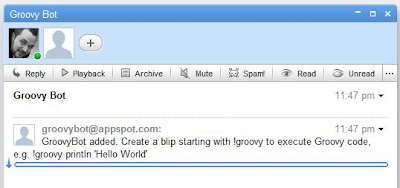
So, if the robot was just added to the wave, we get the wavelet in which the event occured, append a blip to it and add the message to the blip's document. The result looks like this:


This was easy, and to make the robot run a Groovy script and display the result back in the wave is not much harder.

Executing Groovy Scripts
GroovyBot should not execute all messages submitted to the wave as a Groovy script. Instead, if the user wants the content of a blip to be executed as a script, the blip has to start with the prefix '!groovy' followed by the code, e.g.


The event we want to react to is a BLIP_SUBMITTED event. We have to tell wave that our robot is interested in events of this type by specifying this in the file war/_wave/capabilities.xml:

<?xml version="1.0" encoding="utf-8"?>
<w:robot xmlns:w="http://wave.google.com/extensions/robots/1.0">
<w:capabilities>
<w:capability name="BLIP_SUBMITTED" content="true" />
</w:capabilities>
<w:version>0.1</w:version>
</w:robot>

Then we modify the processEvents method to handle these events:

public void processEvents(
final RobotMessageBundle bundle) {

for (final Event e : bundle.getEvents()) {

if (e.getType() == EventType.BLIP_SUBMITTED) {

// Get input
final Blip inputBlip = e.getBlip();
final TextView inputDocument =
inputBlip.getDocument();
final String inputText = inputDocument.getText();

if (inputText.startsWith("!groovy")) {
final String script = inputText
.substring("!groovy".length());

// Execute script
final GroovyShell shell = new GroovyShell();
final StringBuilder result =
new StringBuilder("Result: ");
try {
result.append(shell
.evaluate(script));
} catch (final Exception ex) {
result.append(e.toString());
}

// Create response
final Blip blip = bundle.getWavelet()
.appendBlip();
blip.getDocument().append(result.toString());
}
}
}

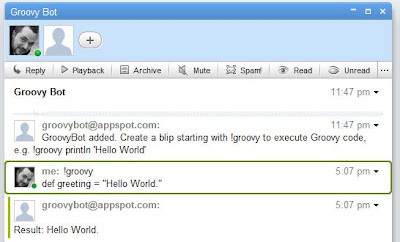
This code first checks if there is an event of type BLIP_SUBMITTED. If so, it gets the blips contents and checks for the prefix "!groovy". Then it removes the prefix, executes the remaining content as a Groovy script with GroovyShell and appends a blip with the result. The output will look like this:


Conclusion
That's basically all, to build a simple Groovy robot. The code above shows a simplified version of GroovyBot which is currently deployed, though. It could be improved in many ways, for example System.out could be captured and also shown in the output. Also, the result could be displayed in another way for a better user experience, for example as a child blip, an inline blip or even as a gadget. But I ran into some issues trying this, for example inline blips were not displayed, or child blips could not be removed and re-added. There are some known bugs in the client API, but all in all, I had a really good experience with wave and its client API. There are many things left, I'd like to do, for example syntax highlighting, using a gadget or making some predefined scripts available, e.g. some DSLs. If you've got some ideas, for example what would be a better user experience, you are welcome. You can start trying GroovyBot right now. It's address is groovybot@appspot.com. Why don't you start with this example, taken from the Practically Groovy series:

!groovy
def zip = "80020"
def addr = "http://weather.yahooapis.com/forecastrss?p=${zip}"
def rss = new XmlSlurper().parse(addr)
def results = rss.channel.item.title
results << "\n" + rss.channel.item.condition.@text
results << "\nTemp: " + rss.channel.item.condition.@temp
println results


Resources
[1] Google Wave
[2] GroovyBot at GitHub (Source Code)
[3] Google Wave Jave Robots Tutorial
[4] Google App Engine


Tuesday, August 18, 2009

Scala Tail Recursion

If you are into Scala, then you eventually may have heard about tail recursion or especially tail call optimization. This post sheds some light on what tail recursion is and on Scala's ability to optimize tail recursive functions.

Tail recursive functions
In Scala it is common to write in a functional style, and recursion is a technique frequently used in functional programming. A recursive function is a function that calls itself (directly or indirectly). Let's take for example the following factorial function:

def rfak(n: Int): Int = {
if (n == 1) n
else n * rfak(n-1)
}

This function calls itself recursively until its parameter n is down to one. The recursive calculation runs like this: rfak(3) = 3*(rfak(2)) = 3*(2*rfak(1)) = 3*(2*(1)) = 6.

Now, the function as shown above is a recursive function, but it is not tail recursive. In a tail recursive function the recursive call is the last action in the execution of the function's body. In the expression n * rfak(n-1), though, first the recursive call is made, and then (as the last action) the result of that call is multiplied by n. So the function is not tail recursive, because the recursive call is not the last action. But we can transform the implementation above into a tail recursive function:

def ifak(n: Int, acc: Int):Int = {
if (n == 1) acc
else ifak(n-1, n*acc)
}

We introduced a second parameter acc. n is like before, but acc (the accumulator) holds intermediate results of the calculation. In this case, in the else part, the recursive call is the last action in the execution of the body, so the function is tail recursive. The calculation process goes like this: ifak(3,1) = ifak(2,3) = ifak(1,6) = 6.

The benefit of tail recursion
So, why would one care if a recursive function is even tail recursive?

If you have a look at how the calculation goes on, again, you will notice, that in the non tail recursive way, the process has to "remember" intermediate results, and that (in consequence) the recursive calls have to be "stacked" until all recursive calls have been made. Then the final result can be calculated: rfak(3) = 3*(rfak(2)) = 3*(2*rfak(1)) = 3*(2*(1)) = 6.

This is not the case with tail recursive functions, as you can see in the process of the second calculation: ifak(3,1) = ifak(2,3) = ifak(1,6) = 6. There are no intermediate results (except for the accumulator argument) and the recursive calls are not stacked (This is why the process of a tail recursive function is also called iterative). In consequence, tail recursive functions are far less expensive regarding memory consumption, at least in theory.

Tail recursive functions in Java
Unfortunately, the JVM does not optimize tail calls itself. For example, if we had implemented the tail recursive factorial function in Java,

public static int ifak(int n, int acc) {
if (n == 1) return acc;
else return ifak(n - 1, acc * n);
}

then for each recursive call a new stack frame is built, which will slow down the calculation and will eventually lead to a StackOverflowError for reasonably large numbers of n. You can also watch this behavior in a debugger, or if you interrupt the calculation, for example by throwing an exception.

public static int ifak(int n, int acc) {
if (n == 1) return acc;
if (n == 10) throw new RuntimeException();
else return ifak(n - 1, acc * n);
}

Then the stacktrace will look like this, showing that the function is called again and again:

Exception in thread "main" java.lang.RuntimeException
at FakTestJava.ifak(FakTestJava.java:32)
at FakTestJava.ifak(FakTestJava.java:33)
at FakTestJava.ifak(FakTestJava.java:27)
at FakTestJava.main(FakTestJava.java:15)

The disassembled byte code instructions, generated by javac, proves this:

public static int ifak(int, int);
Code:
0: iload_0
1: iconst_1
2: if_icmpne 7
5: iload_1
6: ireturn
7: iload_0
8: iconst_1
9: isub
10: iload_1
11: iload_0
12: imul
13: invokestatic #6; //Method ifak:(II)I
16: ireturn

The recursive call is the second last instruction.

Tail call optimization in Scala
Now let's have a look at the byte codes the Scala compiler generated from the code above. Here's the tail recursive code again:

def ifak(n: Int, acc: Int):Int = {
if (n == 1) acc
else ifak(n-1, n*acc)
}

And here are the instructions that comprise the byte codes:

public int ifak(int, int);
Code:
0: iload_1
1: iconst_1
2: if_icmpne 7
5: iload_2
6: ireturn
7: iload_1
8: iconst_1
9: isub
10: iload_1
11: iload_2
12: imul
13: istore_2
14: istore_1
15: goto 0

As you can see, there are no recursive calls anymore. Instead there is a goto as the last instruction, which makes the process simply jump back to the beginning of the function. So, in this case the execution really runs in an iterative process, which is far more efficient than recursively calling the function again, while building new stack frames.

In fact, this is a feature of the Scala compiler called tail call optimization. It optimizes away the recursive call. This feature works only in simple cases as above, though. If the recursion is indirect, for example, Scala cannot optimize tail calls, because of the limited JVM instruction set.


That's essentially it, but if you are interested, let's go and fiddle some more with it. We could do the same as in the Java example above to prove, that there are no additional recursive calls. For example, if you'd throw a runtime exception in the process like this:

def ifak(n: Int, acc: Int):Int = {
if (n == 1) acc
if (n == 2) throw new RuntimeException()
else ifak(n-1, n*acc)
}

and call ifak(10,1) the stacktrace will also tell you that there are no additional stackframes built:

Exception in thread "main" java.lang.RuntimeException
at scalaapplication1.FakTest$.ifak(FakTest.scala:32)
at scalaapplication1.FakTest$.main(FakTest.scala:16)
at scalaapplication1.FakTest.main(FakTest.scala)

But you can also turn off the tail call optimization with a -g:notailcalls flag to the scala compiler. If you run the example again, then the stacktrace will look like this:

java.lang.RuntimeException
at scalaapplication1.FakTest$.ifak(FakTest.scala:32)
at scalaapplication1.FakTest$.ifak(FakTest.scala:33)
at scalaapplication1.FakTest$.main(FakTest.scala:16)
at scalaapplication1.FakTest.main(FakTest.scala)

Finally, let's have a look at how the code looks like when we decompile the class file using a Java decompiler like jd (http://java.decompiler.free.fr/). Here is the code once again:

def ifak(n: Int, acc: Int):Int = {
if (n == 1) acc
else ifak(n-1, n*acc)
}

And here is what jd decompiles from the class file:

public int ifak(int n, int acc) {
while (true) {
if (n == 1) return acc;
acc = n * acc;
n -= 1;
}
}

The tail recursive calls are transformed into an equivalent while loop!

After all, this should not be too surprising.

Resources
[1] Tail calls in the VM